How to track your transaction history
Why Track Transactions?
Tracking your transactions is the key to understanding your collection's true performance. It allows you to calculate your exact cost basis (what you paid) and your realized profit or loss when you sell an item. This data powers the advanced analytics in your portfolio dashboard.
Logging a Purchase
When you add a new item to your collection, you'll be prompted to enter its purchase details. You can also add or edit these details later from your collection dashboard.
For each purchase, you can log:
- Purchase Price: The amount you paid for the item, including any shipping or fees.
- Purchase Date: The date you acquired the item.
- Source (Optional): Where you bought it from (e.g., eBay, TCGplayer, local shop).
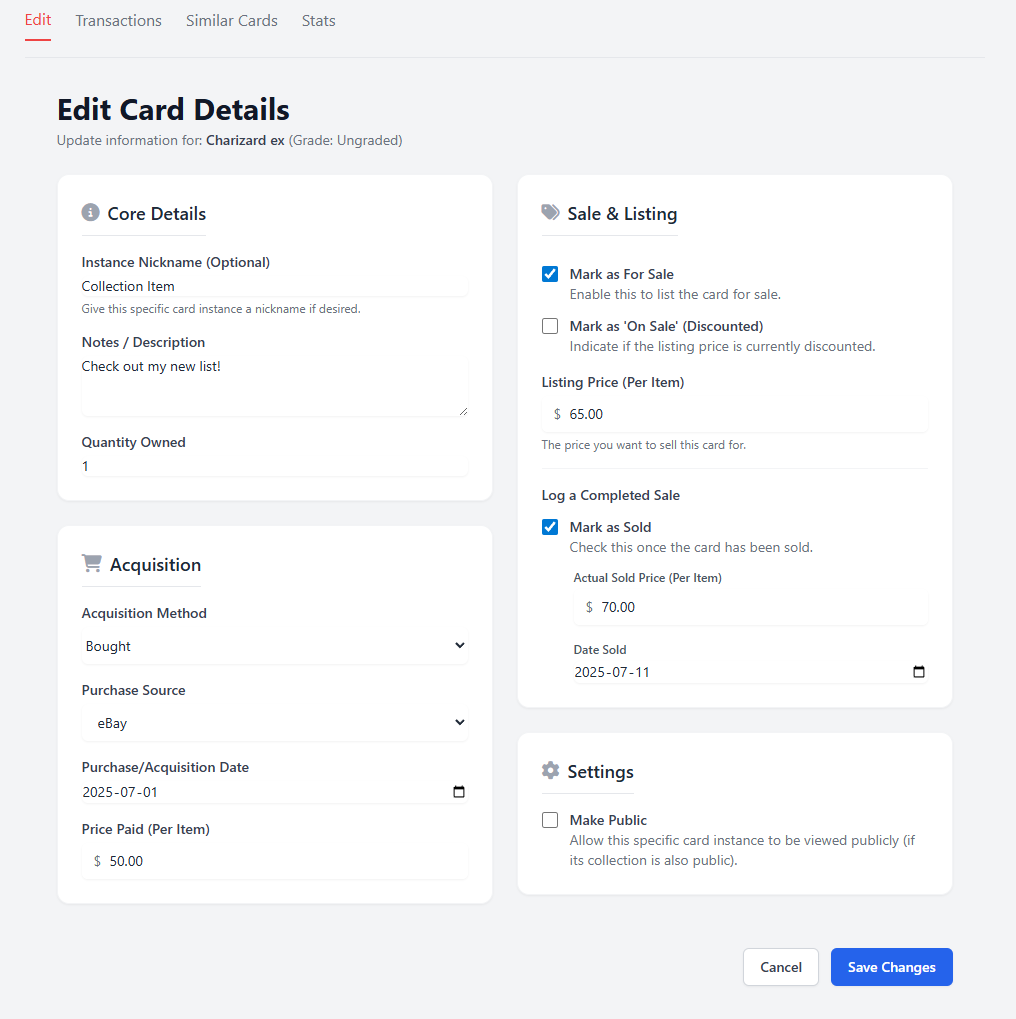
Logging a Sale
When you sell an item from your collection, it's important to log the sale to accurately track your profits.
- Navigate to the item within your collection dashboard.
- Click the "Log Sale / Remove" button.
- Enter the Sale Price and Sale Date.
Once you log a sale, the item will be moved to your "Sold Items" ledger. The system will automatically calculate your realized profit or loss (Sale Price - Purchase Price) and update your overall portfolio statistics.
This complete transaction history provides a full audit trail for your collection, giving you powerful insights into your hobby as an investment.