Your Guide to CollectorWorth
Welcome to CollectorWorth! We've designed our platform to be powerful yet easy to use. This guide will walk you through the key features to help you get the most out of managing your collection.
Building Your Collection
The heart of your experience is your personal collection. Adding an item is simple:
- Navigate to the page of the item you want to add (e.g., the "Obsidian Flames Charizard ex").
- On the right-hand side, you will see the "Collection Tracker" module.
- Click the large blue "+ Add to Collection" button.
- A modal will appear, allowing you to specify the quantity, condition, and any purchase details like price and date.
- Once added, the item will immediately appear in your personal dashboard!
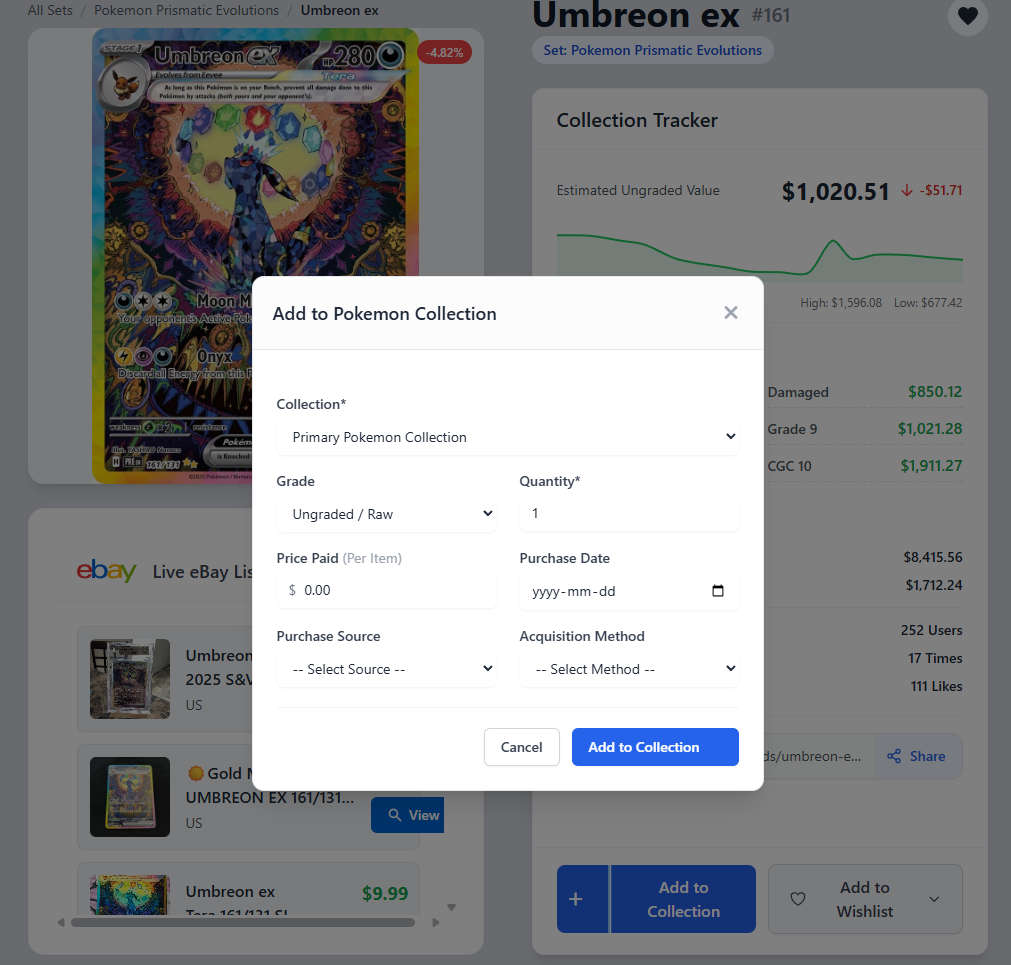
You can also use the small plus icon + for a "Quick Add," which adds one copy of the item directly to your primary collection.
Tracking Your Portfolio's Value
Once you have items in your collection, your dashboard becomes your central hub for tracking value.
- Total Portfolio Value: Your dashboard displays the total estimated market value of all items across all your collections.
- Performance Charts: See how your collection's value has changed over time with our interactive performance graphs.
- Winners & Losers: Quickly identify which items in your collection have seen the biggest increase or decrease in value over the last 30 days.
Using Wishlists
A Wishlist is the perfect way to keep track of the cards or figures you're hunting for next.
- From any item page, click the "♡ Add to Wishlist" button.
- A dropdown menu will appear showing your existing wishlists. Simply click the name of the list you'd like to add the item to.
- Don't have a list yet? No problem! Click the "Create New Wishlist" option to make a new one on the fly, such as "Grail Cards" or "Obsidian Flames Master Set."
We are always adding new features and improving the platform. If you have any questions that weren't answered here, please check our FAQ page or contact our support team.